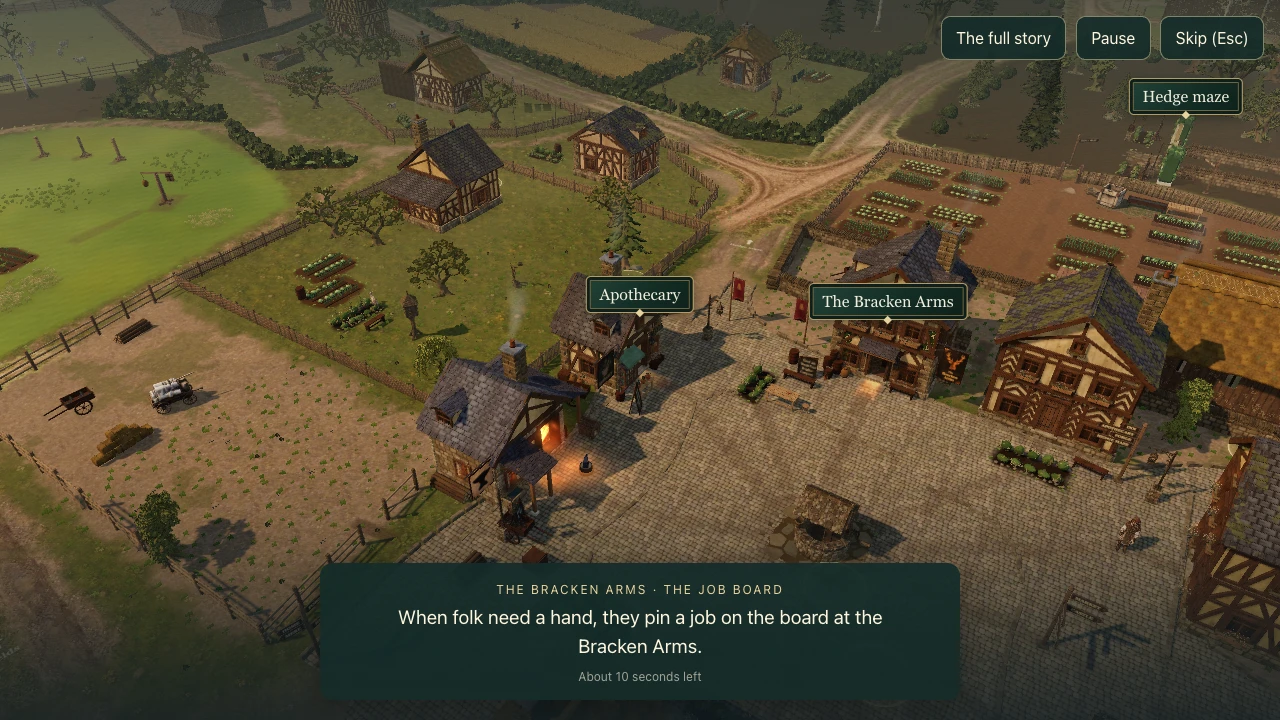
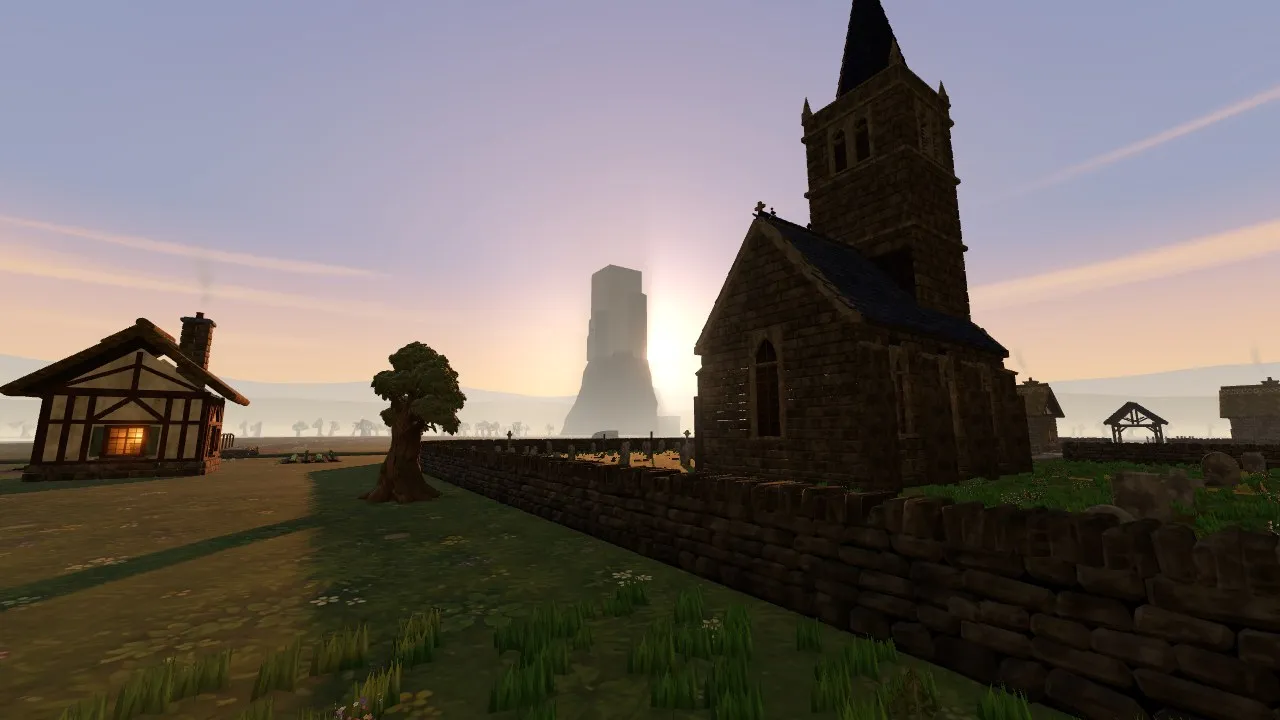
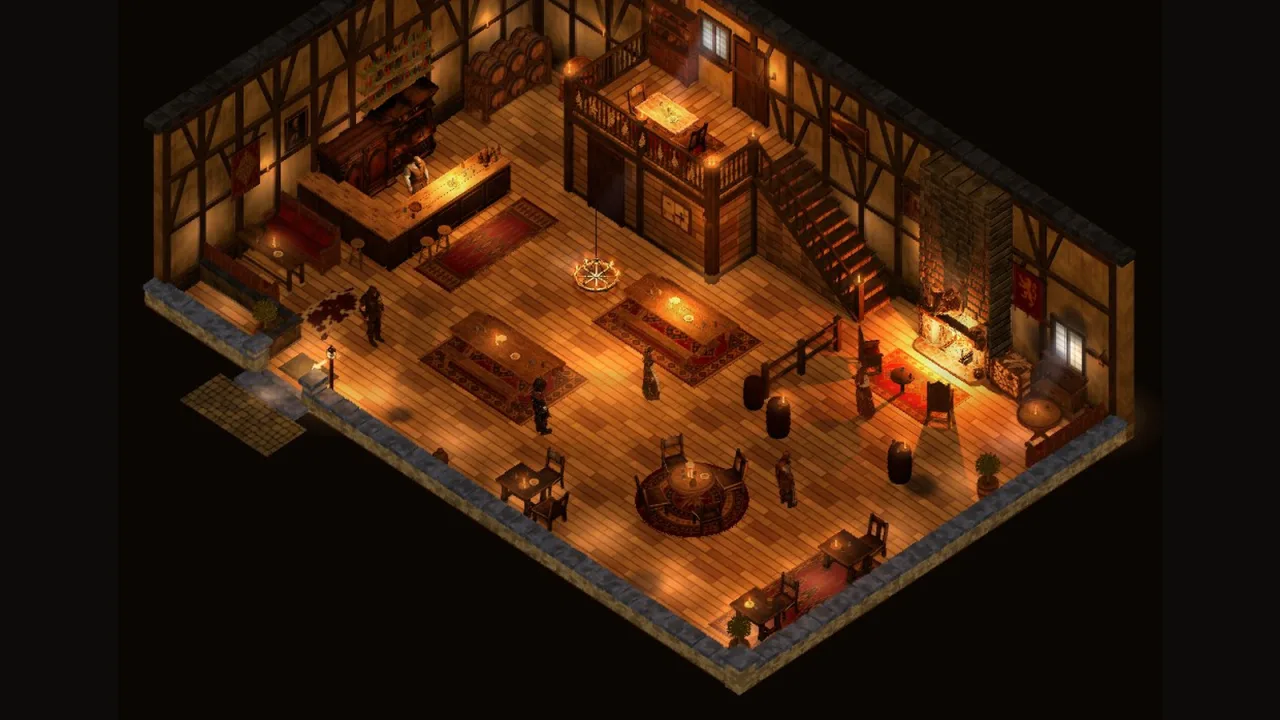
When I first opened the village on my iPad, it ran at 7 or 8 frames a second. Walking around the market felt like flicking through a stack of photos. The touchscreen work from the last few days meant a child could now play the game on a tablet, but not if every step stuttered.
So for two days the whole agent team worked on one thing: graphics settings that make Brackenmere smooth on machines weaker than my Mac. This post is the technical story of that work. It assumes you know roughly what a computer's processor (the CPU) and graphics chip (the GPU) do, and what a frame is, but not much more.
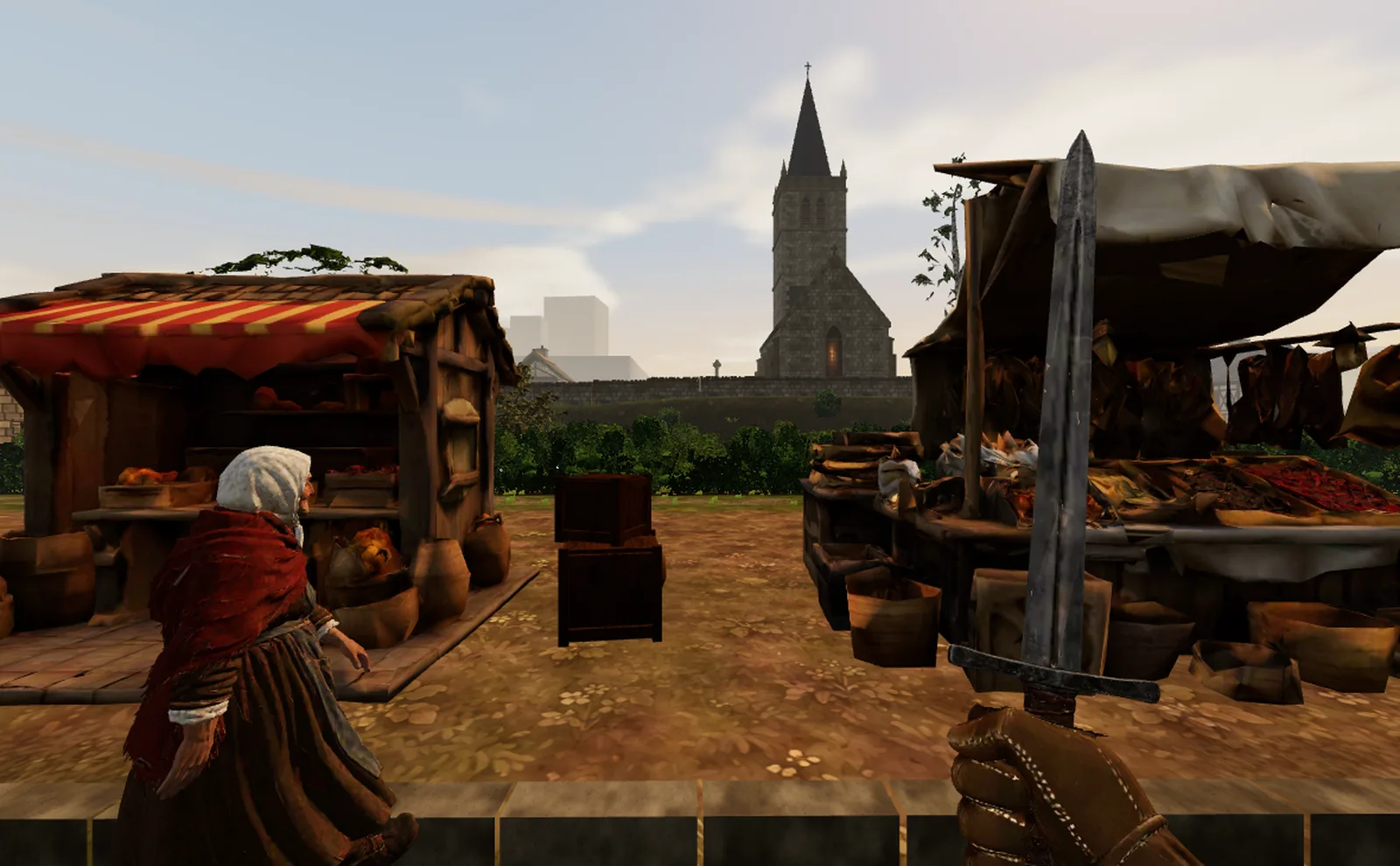 The market in first person on Low, captured on my iPad at the end of the second day. This view went from 6 frames a second to 26.
A frame, in one paragraph
Each frame, the game's code (on the CPU) works out where everything is and hands the GPU a list of things to draw. Each item on that list is a draw: "draw this cottage's walls with this material". The GPU then works out the colour of every pixel on the screen, running a small program called a shader for each one. A frame is ready when both are done. At 60 frames a second, everything has to fit into 16.7 milliseconds; at 45 frames a second, 22.2. Through this post I'll give frame times in milliseconds, because they add up: save 5 ms and the frame is 5 ms shorter, whatever it was before.
The goal: three tiers, chosen by measuring
The game now has three settings the player can see: Low, Medium and High, plus Sharp on top of High for very strong machines. Each has a promise:
- High is the full look, everything the game draws today.
- Medium has differences only a careful eye finds side by side.
- Low is clearly simpler, but still Brackenmere's look, and really smooth.
The targets were 60 frames a second looking down on the village from above, and at least 45 in first person.
Two rules came from me early on, and shaped everything after them.
The first was that the tier must be chosen by what the machine can actually do, not by what it is. In my words at the time, this "should really be based on the ability of the machine rather than the device itself". An iPad can be anything from a five year old tablet to something faster than a laptop, and the same goes for computers. So while the game loads, it runs a short benchmark of its own and picks the tier from the scores. If a machine then struggles in play, the game notices, and the next load takes the tier below.
Under the hood The benchmark draws in the renderer it has just made, before any world code, and takes three scores: fill (ms to shade a megapixel with the full lit stack), vertex (ms a million triangles) and walk (ms for one pass over 12,000 scene nodes). A tier needs all three under its line, with the fill projected to the real screen size at that tier's resolution. Scores average across loads, and the measured tier only moves when two loads agree. The lines were calibrated on three machines: the M5 Pro lands on High (and is offered Sharp), the MacBook Air on Medium, the iPad on Low.
The second rule was about what no tier may lose. "I do want weather, I do want mist, and I do want all the people, no matter what kind of graphic tier you're on." A cheaper tier can draw those things more cheaply, a lighter body for a villager or simpler snow, but never drop them. And I wanted the result to be really smooth, not just slightly better.
How we measured
The iPad as the instrument
My iPad (an A16, running Safari) became the measuring instrument. It is not the target: Low has to cover machines well below it. But it is a real, ordinary tablet, and it sat on my desk.
Early on, every change meant me reloading the iPad and reading numbers off the corner of the screen. I asked whether the agents could reload the iPad themselves and try things out automatically. They could. The iPad now sits on a resting page that keeps asking the Mac what to load next. An agent queues a version of the game with some switches set, the iPad loads it, the game records its own frame times, memory and load time, and sends them back. I just had to leave it plugged in.
The trap of separate loads
The obvious way to measure a saving is to load the game once with it off, once with it on, and compare. For most of the first afternoon, that is what we did. The numbers looked wonderful: drawing the sky was costing 12 ms, the contact shadows under objects 11 ms, the glows and smoke 10 ms.
Then the numbers stopped agreeing with each other. The same build, loaded twice, could differ by up to 13 ms. The cause turned out to be the town's own clock. The village has weather, and the weather changes on a schedule. In each test the in-game time started at 15:00, and at 15:30 a weather change began blending in and switched on the cloud deck, about 70 seconds after the game was ready. A short run measured the clear sky, a long run measured part clear and part cloudy, and the difference between the two was bigger than most of the savings we were trying to measure.
So the afternoon's big single-load savings were mostly the weather. We threw them out.
One load, switches flipped live
The fix was to stop comparing loads at all. Each saving we wanted to test was made switchable while the game runs. The iPad loads the game once, waits for it to settle, then flips between version A and version B every 20 seconds, back and forth. Both sides share the same load, the same memory, the same warmth of the tablet. The town's clock and the weather are pinned, so the same people walk the same routes under the same sky.
Under the hood After a 40 s settle, the sides alternate every 20 s through a live set of switches the renderer reads before each frame. The first five-second window after each switch is dropped, and each side takes its median frame gap. The town is seeded and started at 15:40, past the 15:30 step, and the weather is pinned. A switch may only change uniforms, draw orders or geometry, never compile a new shader in play, so flipping it costs nothing itself.
Safari wears out
One limit we only found by hitting it: Safari on the iPad wears out. After about 40 loads of the village it starts failing to load the game at all, and the only cure is to quit and restart Safari, which only I could do. So the agents started counting loads, saved the last few for the tests that mattered, and asked me to restart Safari before the next batch. The one-load method helped here too: one load replaced two to six.
Step one: the Low set
The first day started on a test bed, a stripped-down scene where each kind of object could be switched on and off alone. That gave a cost map, and a first Low set:
- Simpler lighting. The full lighting model works out how shiny and rough each surface is. Low uses an older, much cheaper model that only asks how much light hits it.
- The ground baked once. The village ground blends several textures per pixel (grass, earth, paths, mud). On Low, each chunk of ground is painted once into a single texture when it loads, and drawn from that.
- No weathering or grit on the buildings, and simpler live snow, wet and frost.
- Stone walls as shells: a textured surface instead of every individual stone.
- Lighter villagers: the same people, with bodies of about 4,000 triangles.
- No sun shadows. These were too expensive: on the iPad they took first person from 29 to 51 ms.
On the test bed, this set held 60 frames a second. In the real village it did not. It halved the frame times, but the market was still around 90 ms in first person (11 frames a second). With every single object hidden, the frame was already 17 to 19 ms. The rest was the scene itself: the buildings, the Meshy models, the ground, the effects, the plants and the people, each costing several milliseconds.
Step two: lighter objects
The second morning was about the objects themselves. My honest reaction to 22 frames a second at the market was "I can't believe that we can't make it faster", and the question was whether simpler models would help.
For each kind of object, an agent made lighter versions, captured them side by side in the same spot, and put the pictures on a comparison page for me to judge by eye.
- Cottages, the inn, the forge, the apothecary, the shop-houses and the barns. The oak frame became flat strips on the plaster, the slates became notched strips, but the real corner stones stayed. The chapel got a flat version too.
- Trees. Every Meshy tree was regenerated through Meshy at 4,000 to 6,000 triangles as a Low and Medium twin; High keeps the originals. I said "No cap, and let's do it for all trees", then judged each twin: the churchyard yew came out too light and was darkened, floating twigs were cleaned off by script, and the village oak's twin had its crown floating clear of its branches, so it got a local cut of the original instead.
- Vegetable rows became flat cards on Low and fewer leaves on Medium.
- Walls, kerbs, fences, hedges and market stalls got shells and cuts, as did dry-stone walls, bushes, headstones, ferns, gates, flower beds and lean-tos.
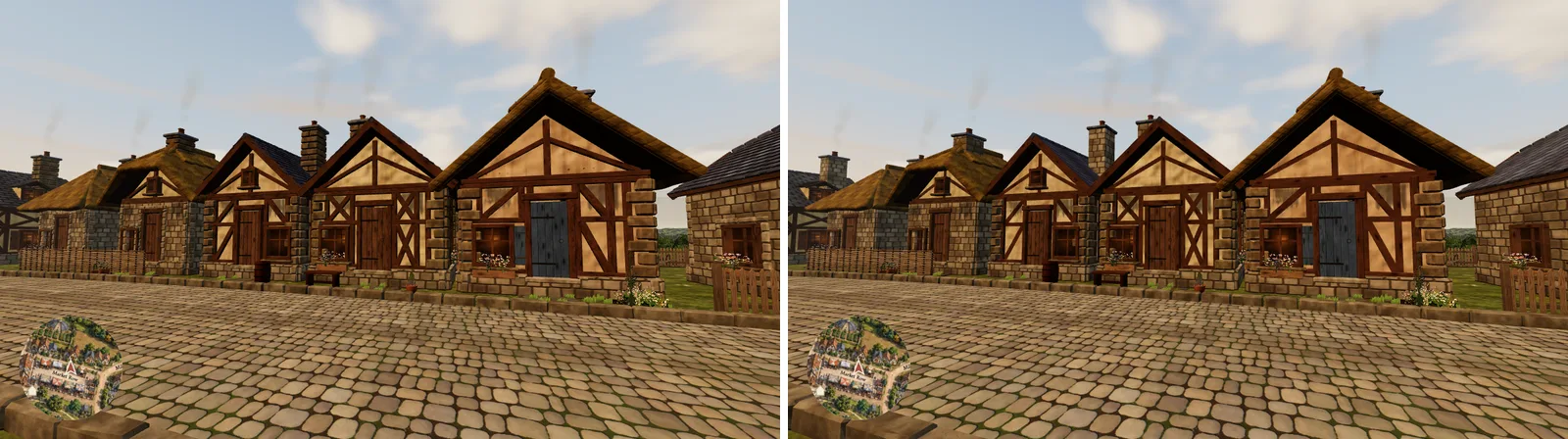 The cottages, full (left) and on Low (right). The frame and slates are flat strips now; from the street it is hard to tell.
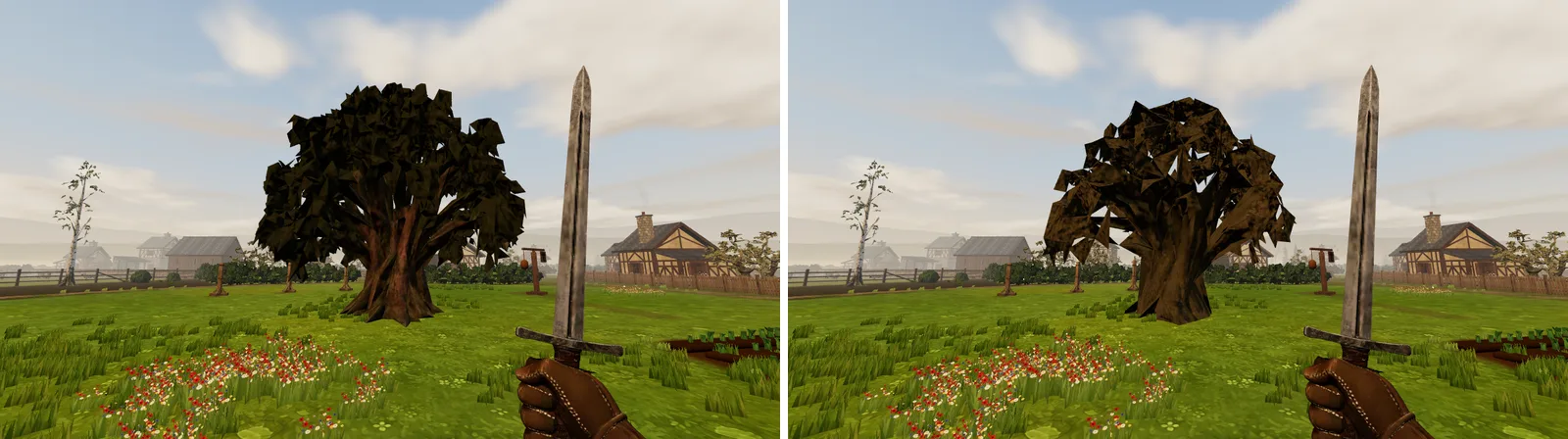 The churchyard yew and its lighter twin, at 10 metres. The twin was darkened a little after I judged the first round.
Under the hood One slate cottage went from 17,900 triangles to 9,062 in the version I picked. The yew went from 14,315 to 2,057 triangles, the bare tree from 20,000 to 3,220. High keeps every original, and Low's asset lists name the lighter files in place of the full ones, so no tier downloads more.
These changes cut the triangles in the market's first-person view by a quarter. Their effect on the frame time was harder to read, because this was before we had found the weather problem, and the timings from that stage were exactly the separate-load kind we later threw out.
What we tried that didn't work
Merging draws
The most promising idea on paper was to draw less often. If the game hands the GPU 900 separate draws a frame, and each draw has a fixed cost, then packing many objects into one big draw should save time. Browsers offer a way to do this, called multi-draw, and the agents built it: every chunk's scenery copied into pages, one draw per material across the whole region.
On the iPad, first person went from 929 draws to 654, and the frame time went from 70 ms to 69. Overhead it was worse: the pools that hold the packed data cost time of their own, and the village green overhead went from 42 ms to 18 when they were turned off.
To find out why, an agent wrote a tiny test page that does nothing but draw boxes in different ways, and ran it on the iPad. It showed that Safari doesn't really have multi-draw: it pretends to, and runs each range as a separate draw anyway. It also showed that a draw on the iPad costs only 6 to 9 microseconds. At around 650 draws, that is about 5 ms of a frame that was then 55 to 65 ms long. The draws were never the problem.
Under the hood The draw-check page, raw WebGL 2 on the iPad: separate draws (each with its own vertex array and uniform, as three.js does) cost 8.6 µs per extra box; one multi-draw over the same ranges, 5.7 µs; one merged buffer or instancing, effectively nothing. Packing now runs on High only, where it doesn't hurt. On the MacBook Air on Medium it cost 1 to 1.6 ms.
Cheaper glows, smoke and water
The separate-load tests had said glows, flames and smoke cost about 10 ms. Once measured properly, in one load, cheaper versions of the glows, the smoke and the water saved nothing beyond about 2 ms either way, inside the noise. They stayed as they were.
Thinning the distant plants
Thinning grass, flowers and hedges beyond 30 metres sounded like a good follow-up to the middle-distance work below. In the one-load test it saved 0.2 ms. It is kept behind a switch, off.
A few more
Some of the day-one ideas also came to nothing: redesigned timber frames, roofs and fences showed no measurable gain, and several render cuts (sorting by material, finer culling) were within the noise or slower. A change to load textures later saved no measurable time and touched how the game decides it is ready, so it stayed parked.
What worked
Once the measuring was honest, the gains came from a handful of changes, each one tested in a single load on the iPad.
The sky drawn last
The game used to draw the sky first, then the village on top of it. That sounds harmless, but the sky's clouds come from a fairly heavy shader, and drawing it first meant it ran for every pixel on the screen, including the ones about to be covered by a house.
Now the sky is drawn after everything else, only where nothing is in front of it. The picture is the same. The frame is 5.1 ms shorter in sunshine and 8.5 ms shorter under overcast, when the clouds are thick. This was also the explanation for the 15:30 mystery: what got switched on mid-run was the cloud deck.
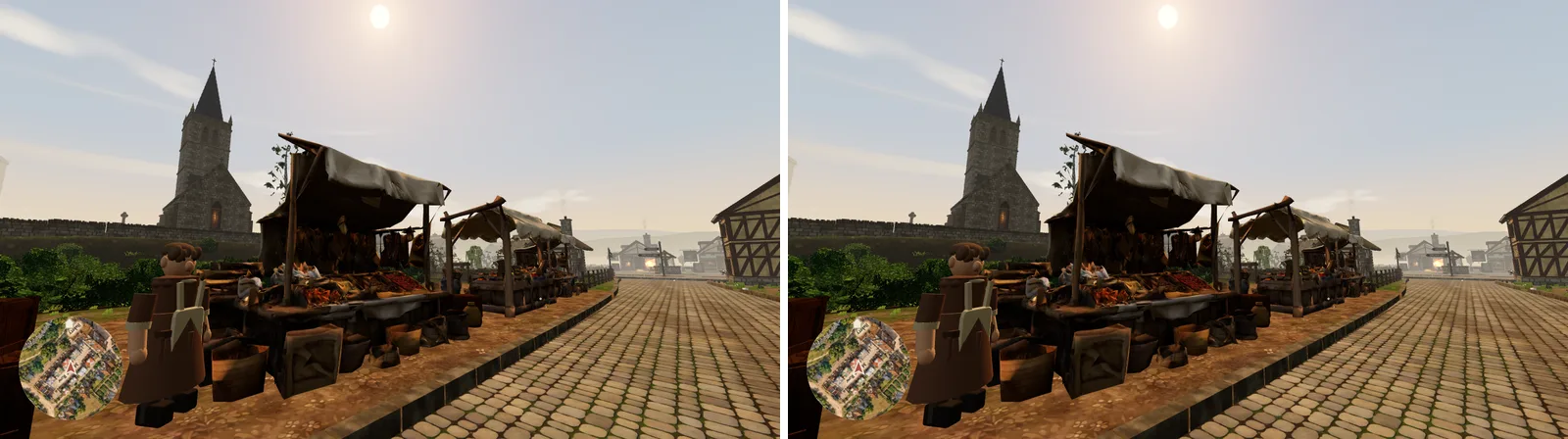 Sky drawn first (left) and last (right). Only 34 pixels differ, by a tiny amount. The right one is 5 to 8.5 ms cheaper.
Under the hood The sky draws on the far plane after the opaque scene, so the depth test throws away every covered pixel before the cloud shader runs. Across day, night, mist and overcast, under 50 pixels differ in any view, by at most 10 out of 255. The backdrop hills moved behind the land the same way.
The clouds drawn into a small map
The next step was to make the clouds themselves cheaper without changing them. Instead of working out the cloud pattern at every pixel of sky, every frame, the game now paints it into a small map of the sky, a quarter of the map each frame, and reads the sky from that map. I couldn't see any difference, even side by side. Under overcast on the iPad it saved 6.3 ms.
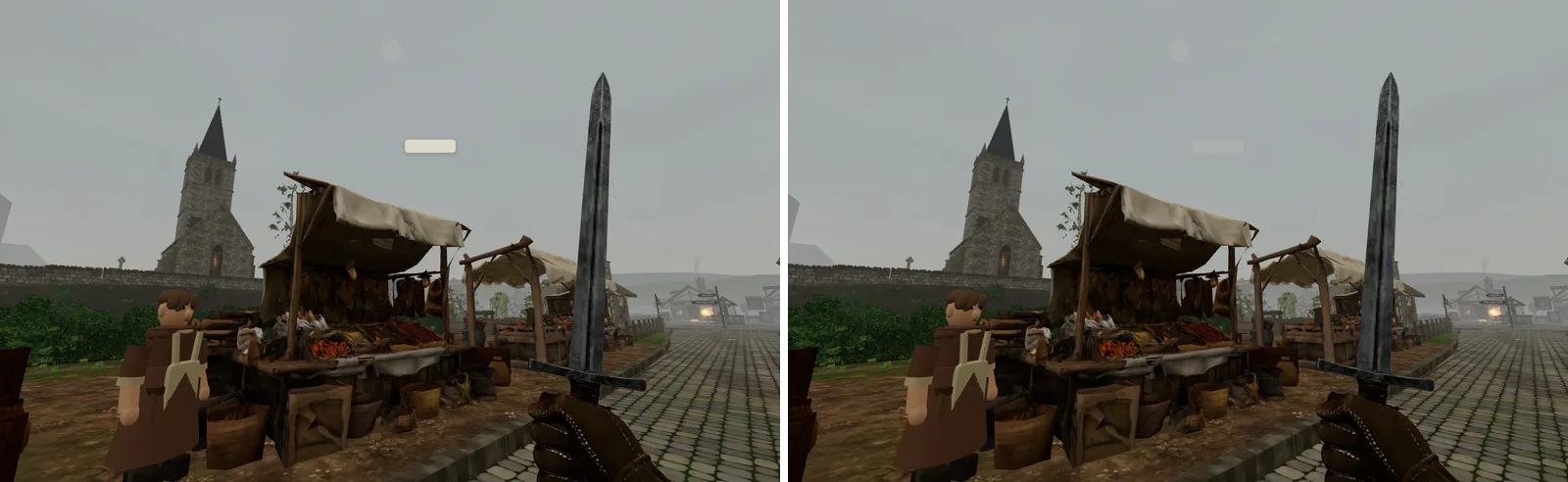 Overcast clouds worked out at every pixel (left) and read from a small map (right).
Under the hood The map is 512 by 512, a quarter redrawn each frame, and the whole map at once when the weather jumps (a pinned change, a lightning flash), so no quarter of the sky lags behind. The first version swung between 23 and 40 ms from window to window; it now does the same work every frame and compiles its program during the loading screen. A cheaper cloud shader (three layers of noise instead of five) was also tried: it saved only about 1.5 ms more and the high wisps visibly went, so it wasn't taken.
The middle distance
A test that hid everything further than 30 metres away saved 17 ms in first person. That told us where to look: not the far distance, which is already drawn as simple tiles, but the band in between.
The biggest single part of that band was the stone and box records: the thousands of stones, beams and blocks that the game builds walls and buildings from, each with its own shape. Past 30 metres, on Low, each one is now drawn as a plain box. At that distance, in that haze, you can't tell. It saved 5.6 ms.
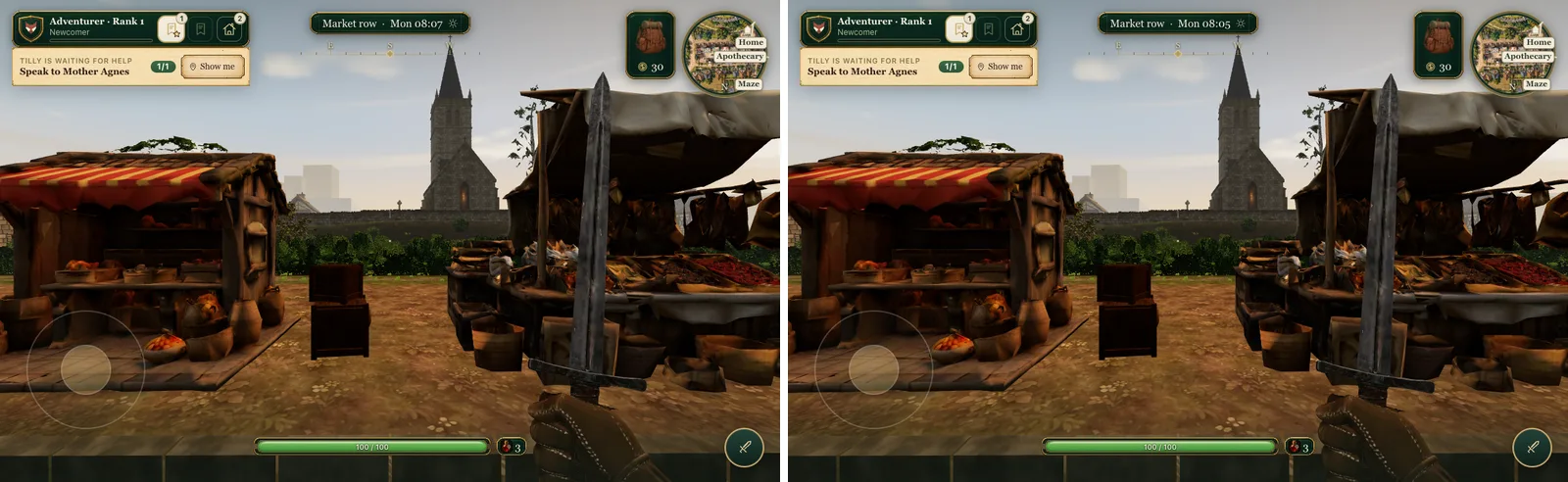 The market with full detail (left) and with stones and beams past 30 metres as plain boxes (right).
Under the hood Past 30 m a chunk's stones, boxes and beams draw as plain boxes of 12 triangles each from the same record buffer, with 2 m of hysteresis so nothing flickers at the edge, swapped only around the first-person render. Hiding the records alone past 30 m was worth 6.5 ms; the box version kept 5.6 of it. The same switch on Medium saved only 0.6 ms on the Air, so Medium doesn't use it.
A 40 metre ring in first person
In first person, Low now draws the village at full detail only for the chunks within 40 metres, and lets the far tiles (simple pre-baked stand-ins) take over beyond that. I was cautious about this one. Before building it properly I said "There's no point us completely going for it when we haven't measured the improvement", and asked for pictures at 40, 28 and 24 metres. Ring 40, I thought, "is totally acceptable in first person". On the iPad it took the market from 50.2 ms to 43.9.
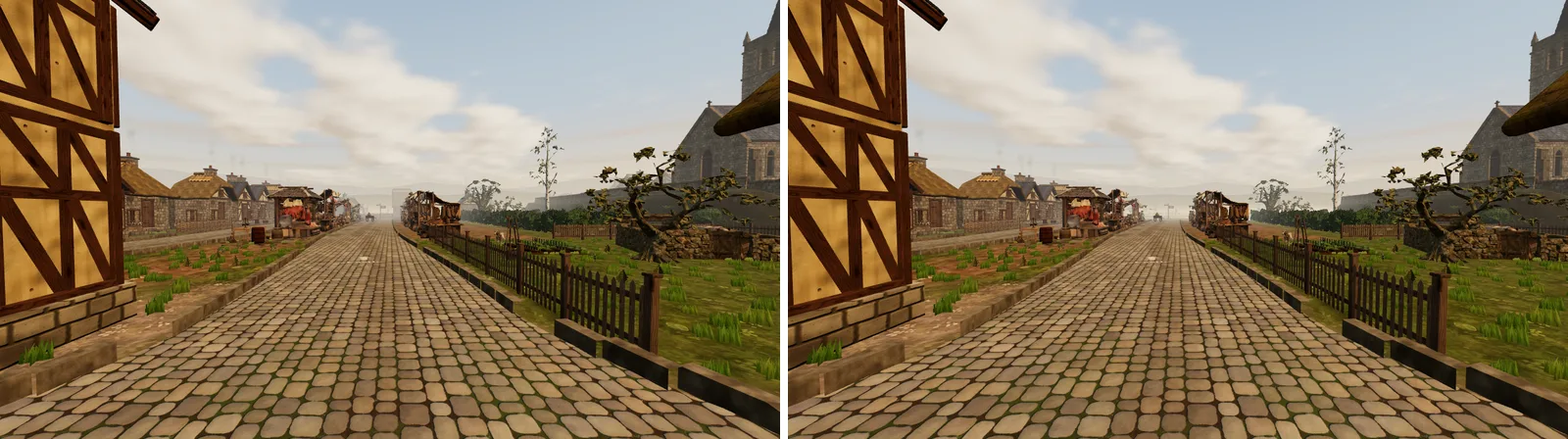 Down Market Row: every chunk at full detail (left) and the 40 metre ring (right). The far end of the street is the far tiles.
Under the hood The ring is measured to each 32 m chunk's nearest edge, so on the iPad's chunk layout full detail ends 51 to 65 m along the view at every first-person spot, against 71 to 115 m before. It cut first-person draws by about 30% (market 658 to 468). The ring only applies once the far renderer has loaded: if the far tiles fail or are still on their way, every chunk is drawn.
The per-frame trim
Alongside the GPU work, the game's own code got a trim. One find was a good example of the kind of thing that hides in a game: the in-game help, which offers a hint when you look stuck, was checking whether anything else was showing on screen on every frame you were walking. That check makes the browser lay out the whole page again, every frame, for a hint that wasn't even due. Now it only asks when a hint is up or due.
There were a dozen smaller cuts like it: the hero's cape is skipped in first person, where you can't see it; chunks that haven't moved are skipped when the game updates positions; whole chunks are tested for visibility before their contents; the effects share one clock per region. Together with the Low set, they took the game's own code in the market from 39 ms a frame to 10.6.
Under the hood The matrix walk (three.js updating every object's position for the frame) went from 6.8 ms to 2.4 to 2.9 by skipping still chunks; culling per chunk saved about 2.5 ms. Bloom now walks only its own sources, and the sun's shadow pass skips chunks it can't reach. The village staging reads its rules once per in-game minute instead of every frame.
The quiet ladder
The last piece is for the machines that are weaker still. Within each tier, the game watches its own frames. When more than a fifth of them miss the screen's refresh, it quietly sheds one thing at a time, least visible first: the small life in the world, the town's distant bands updating less often, mist at half resolution, tree cards sooner, then a lower resolution. When frames are back on time for three seconds, it gives each one back. In the market in first person on the iPad, with the ladder on as players get it, the frame went from 39 ms to 24.5 (41 frames a second), with the picture drawn at 0.8 resolution.
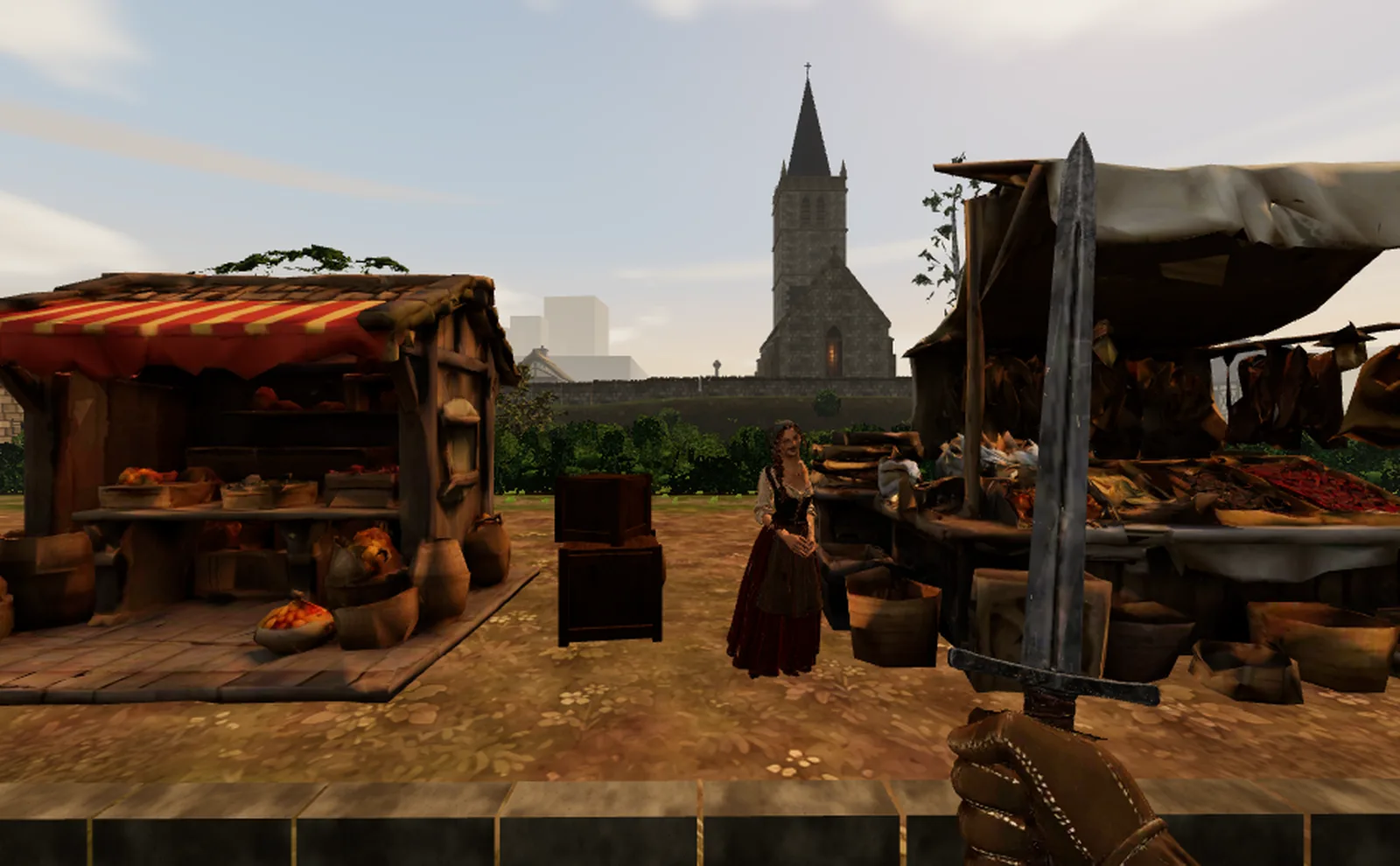 The market with the quiet ladder on, as players get it. It runs at 41 frames a second here.
Under the hood A step has to earn its keep: if the next window is still busy and the median and mean frame gaps aren't 10% shorter, the step is undone, held, and the next one tried. Every step is a hot change (a uniform, a count, a pass skipped, a pixel ratio), never a shader compiled in play. And if a session sits on its tier's visible step for two minutes, the next load takes the tier below until two loads in a row score above it.
Bugs found along the way, and the checks that stop them returning
The scrambled villagers
Halfway through the second day I was looking at the iPad and saw that something had gone wrong with the people. They were, in my words, "all kind of this weird mess of meshes and color".
The lighter bodies for Low had been made by an automatic tool that simplifies a model by merging nearby points. It had merged points along the seams where a body's texture is cut and laid flat, so the texture was being wrapped onto the body in the wrong places. The fix was a new cut that keeps every seam. Six of the villagers' lighter bodies still didn't pass, so on Low those six simply keep their full bodies.
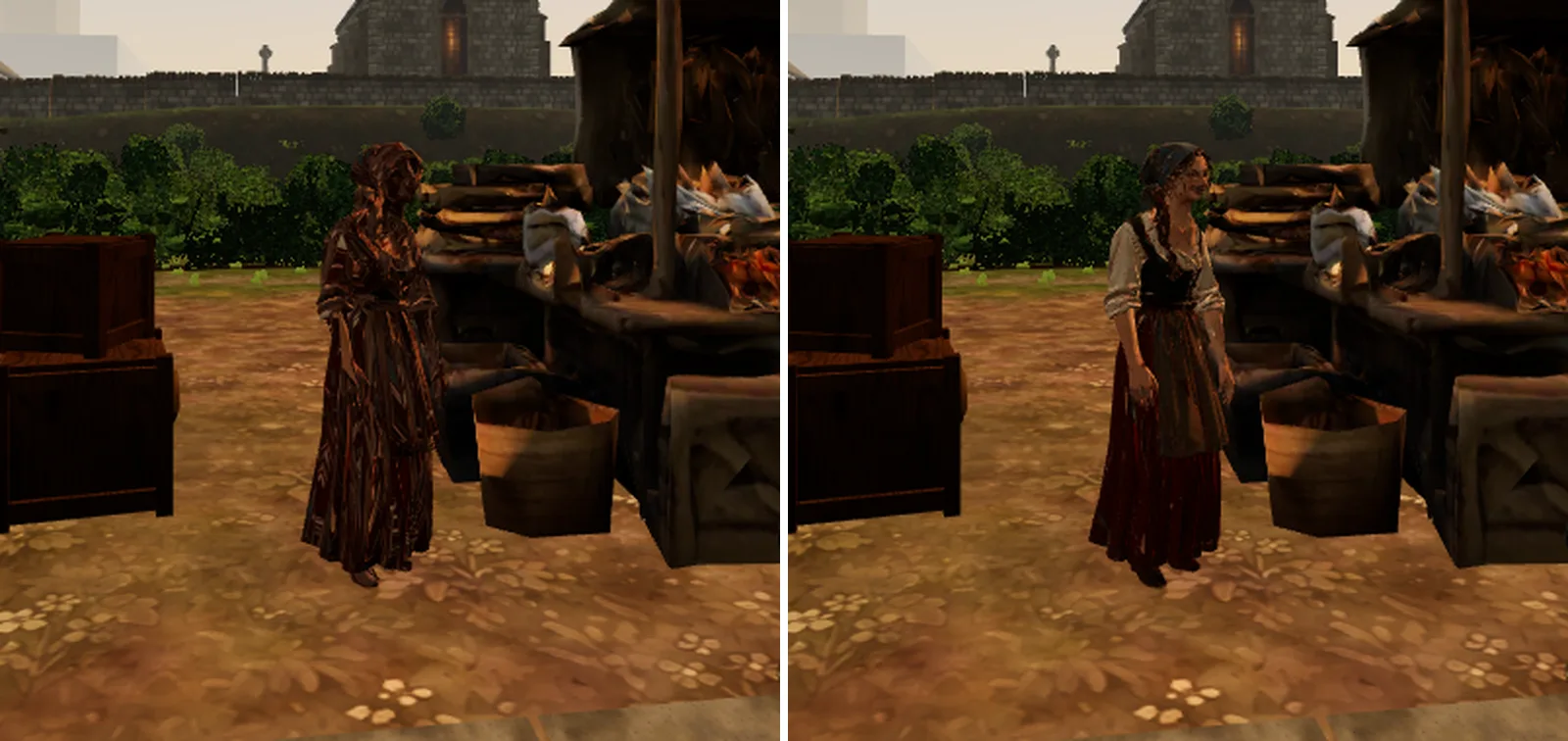 A villager on Low before the fix (left) and after (right).
To stop it coming back, there is now one audit for every lighter file the game ships, all 90 of them: people, Meshy models, trees and stalls. Each lighter file is compared with its original, and fails if the way its texture wraps or its colours drift too far.
Under the hood Local cuts are held to their source by UV, Meshy remeshes (which have new UVs) by colour; seen and unseen (alpha) are compared too. The bar is 3% of the body differing: the shipped cuts closest to it sit at 2.8 to 2.9%, and the six that fail (3.2 to 4.6%) ship their full body. A new tree cut only replaces the shipped one once it passes.
The broken far stand-ins
The 40 metre ring meant far tiles showing much closer than before, and they turned out to be broken in ways nobody had noticed. Looking down Market Row, there was a hole where the chapel should be, just a few floating louvres. On the green, the barn was a roof over nothing and the trees beyond were grey shards.
The cause was in the bake that makes the far tiles. Each chunk was cut down to its share of the tile's triangle budget with no limit on how much it could lose, and the cut threw away small loose parts first. A building made of many separate stones, boards and slates was cut down to a roof, a few louvres, or nothing. Most of it had been hidden by distance and haze until the ring brought it closer.
I asked whether we were "making a rule here in general that captures the whole Brackenmere world", rather than fixing the two buildings in the screenshots. We were. Every piece that reads from far away now gets a stand-in made of solid volumes from what it was built from: a building is its walls up to the eaves and a gable roof, a tree is a trunk and a crown. And a new far audit runs in every bake, comparing what each tile kept against the piece as built. If anything is missing, too short, too thin, has lost its walls or its colour, the bake fails and names it.
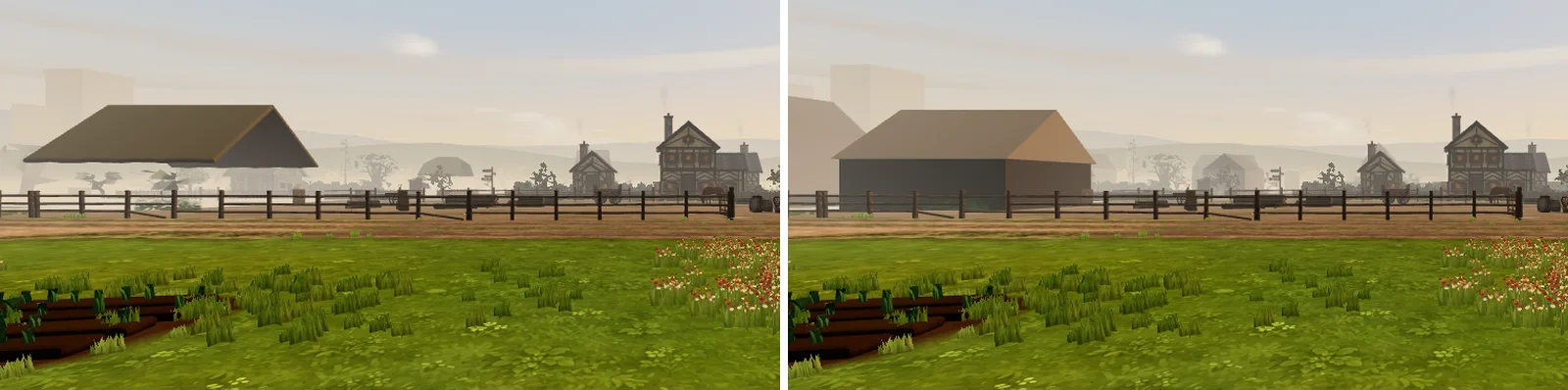 The barn on the green before (left) and after (right) the stand-in fix.
Under the hood The audit fails a piece that is gone, under 3/5 of its height, under half its width or depth, a roof over nothing, colourless, or mostly slivers. On its first run it found 46 cottages, 135 hedgerows, 6 barns, the lean-tos, the dovecotes, the castle's walls and towers and the stalls affected in the village alone. Stand-ins are now drawn whole and the rest cut to what's left of the tile's 15,000 triangles. The village's far tiles grew from 1.42 to 1.70 MB, shared by every tier.
How we checked it all
Every change had to pass three kinds of test.
By eye. Anything that changed the picture went to me on a comparison page: the same spot, the same moment, before and after, captured on Low, with the frame times next to each picture. I decided each one. Changes that were meant to look the same, like the sky drawn last, were checked by comparing the two pictures pixel by pixel, not just by eye.
On the iPad. Every saving was timed in one load, alternating with the version before, on the real village. A saving that didn't show up there didn't ship, however good it looked on paper.
By the automatic checks. Each piece was reviewed by a second model until a round came back clean. The UV audit and the far audit now guard the two bugs above. And the game's full check (build, story data, smoke tests and 4,274 unit tests) passes on the finished work.
Results
On my iPad, on Low, from the game as it stood with every saving off, to the first Low set, to now:
- Market, first person: 176 ms (6 frames a second), then 90 ms (11), now 39 ms (26). With the quiet ladder on, 24.5 ms (41).
- Village green, first person: 156 ms (6), then 77 ms (13), now 22.1 ms (45).
- Village green, overhead: 103 ms (10), then 20 ms (49), now 18.2 ms (55).
- Market, overhead: 154 ms (7), then 64 ms (16), now 47.3 ms (21).
That is four and a half times faster in first person. Mid-way through the second day I wrote: "I'm seeing 55 frames per second on the overhead green on the iPad right now. This seems very promising." It stayed there.
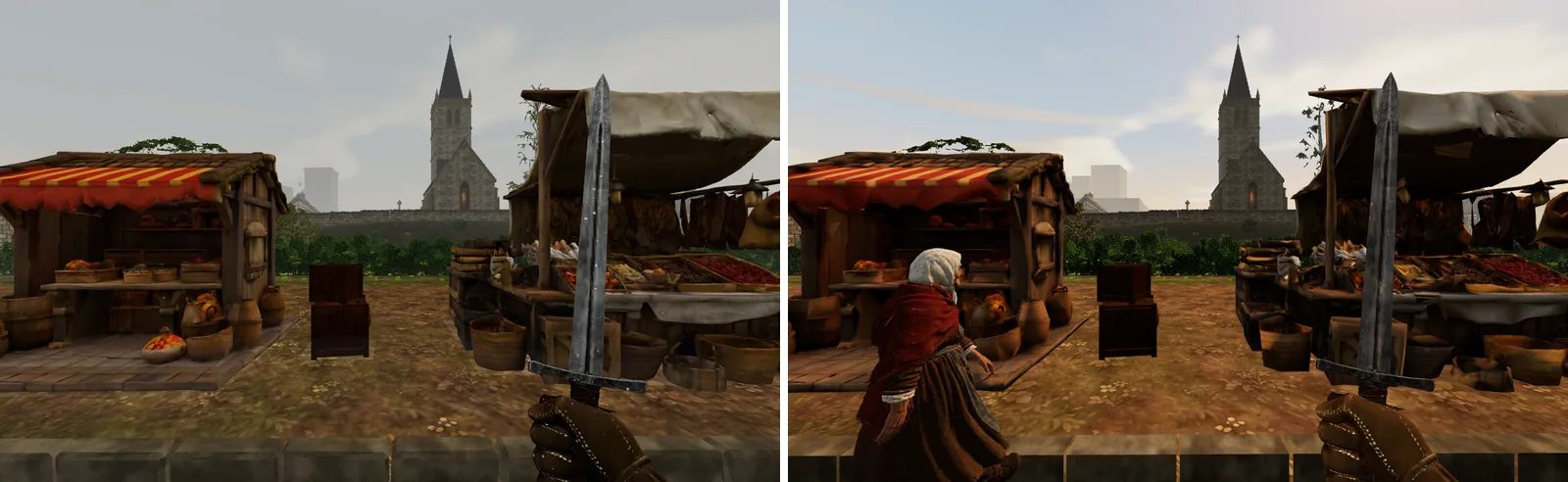 The market on the first Low set at 11 frames a second (left) and on today's Low at 26 (right).
The GPU memory in the market is 239 MB, under the 300 MB budget (the first Low set had pushed it to 389). The game is ready between 8.5 and 11 seconds after loading on my home network, about the same as before. There were no crashes in any of the final runs.
On the MacBook Air, which lands on Medium, the overhead views went from 23 to 42 frames a second at the market and from 21 to 48 on the green. In first person the Air runs at about 30 frames a second, and there the limit is the processor, not the graphics chip. High on my Mac keeps the full look; it only took the changes that look exactly the same.
Why first person on the iPad isn't at 60
The honest answer is that the iPad's graphics chip is now the wall, and there isn't much room left to take out.
The market in first person is 39 ms. The game's own code is about 11 ms of that, and the draws about 3 to 5 ms, so neither is what's holding it back. An earlier test that drew only a quarter of the pixels saved 16 ms, which says the frame pays mostly per pixel shaded. And even with every object hidden, the frame was already near 17 ms. So 60 frames a second in first person would need more than half of what's left to disappear, with almost nothing outside the scene to cut.
45 frames a second needs about 16 ms more. The cheapest routes there are the ones that are already half built: the quiet ladder's lower resolution, which already reaches 41 in the market, and a shorter ring that brings the far tiles closer. After that come visible choices: fewer small objects near the hero, or a simpler shader for the near scenery on Low, which would be a week's work. 60 in first person on this iPad probably needs a new rendering path altogether, like the WebGPU renderer that three.js now offers, and that is a separate project. The overhead market, at 21 frames a second, is now the weakest spot.
What I care about most is that the gains are real. Every number in this post was measured on a real tablet, in one load, with the weather held still. And the village still has its weather, its mist and every one of its people, on every tier.
Appendix: the numbers
The tables behind this post, as they stood at the end of the work.
Final scoreboard (iPad, Low, build 985abc3cf, 18:18)
| Run | Frame gap (p95) | fps | This morning | Peak GPU | Ready |
|---|---|---|---|---|---|
| Market first person, sunshine | 39.0 ms (39.5) | 26 | 90 ms | 228 MB | 10.8 s |
| Market first person, ladder on (as players get it: 0.8 resolution) | 24.5 ms (33.8) | 41 | 227 MB | 8.9 s | |
| Market first person, overcast | 37.7 ms (39.3) | 27 | 226 MB | 9.1 s | |
| Market first person, walking | 34.7 ms (46.1) | 29 | 256 MB | 9.1 s | |
| Market overhead | 47.3 ms (47.7) | 21 | 64 ms | 225 MB | 8.9 s |
| Green first person | 22.1 ms (24.5) | 45 | 77 ms | 191 MB | 8.5 s |
| Green overhead | 18.2 ms (18.3) | 55 | 20 ms | 190 MB | 8.5 s |
Low on the iPad (target: 60 fps overhead, 45 fps first person)
| Spot | Today, no savings (00:10) | This morning: the Low set (00:10) | Now | Target |
|---|---|---|---|---|
| Market, overhead | 154 ms · 7 fps | 64 ms · 16 fps | 47.3 ms · 21 fps | 16.7 ms |
| Market, first person | 176 ms · 6 fps | 90 ms · 11 fps | 38.4 ms · 26 fps run 1230, sunshine; 37 ms under overcast | 22.2 ms |
| Green, overhead | 103 ms · 10 fps | 20 ms · 49 fps | 18.2 ms · 55 fps run 1202 | 16.7 ms |
| Green, first person | 156 ms · 6 fps | 77 ms · 13 fps | 22.1 ms · 45 fps | 22.2 ms |
| GPU memory (market, first person) | 246 MB | 389 MB | 239 MB | 300 MB |
| Ready after load (LAN) | 9.2 s | 9.2 s | 8.2-9.0 s | |
| JS a frame (market, first person) | 39 ms | 24 ms | 10.6 ms (render 7.0) | |
| Draws · triangles (market, first person) | 934 · 2.44 M | 930 · 1.91 M | 515 · 0.81 M |
Medium on the Air (target: 60 fps overhead, 45 fps first person)
| Spot | Before the Medium set (overnight) | Medium today | With a shorter Medium ring |
|---|---|---|---|
| Market, overhead | 43 ms · 23 fps | 23.9 ms · 42 fps | no change overhead |
| Green, overhead | 47 ms · 21 fps | 20.8 ms · 48 fps | no change overhead |
| Market, first person | 33.0 ms · 30 fps | ring 40: 25.4 ms · 39 fps ring 56 / 48 / 40: 38 / 38 / 38 fps (medium-ring.html) | |
| Green, first person | 31.4 ms · 32 fps | ring 40: 25.3 ms · 40 fps | |
| GPU memory peak (first person) | 748 MB (mostly Meshy textures) | 657 MB at ring 40 | |
| Ready after load | 10.0-11.5 s | 10.7 s |
High on the M5 Pro
| Spot | This morning | Now |
|---|---|---|
| Market and green, overhead and first person | not re-measured | not re-measured: High gained only changes with no visible difference |
Shipped as defaults
| Change | Tiers | Evidence |
|---|---|---|
| Sky drawn last, only on uncovered pixels | all | iPad −5.1 ms sunshine, −8.5 ms overcast, same picture (where-are-we, sky-backdrop) |
| Clouds worked into a small sky map, a quarter a frame | all | iPad overcast −6.3 ms; Nick: no visible difference (clouds) |
| First-person ring 40 m, far tiles beyond (waits for the far renderer) | Low | iPad −6.3 ms (50.2 → 43.9); Nick approved (ring) |
| Middle distance: stones and boxes past 30 m as plain boxes | Low | iPad −5.6 ms, same picture (where-are-we) |
| Frame code: cape off in first person, Meshy front faces, matrix walk skips still chunks, per-chunk culling, tint as vertex colour, effects one clock a region, bloom walks only its sources, shadows skip unreachable chunks, help ladder, staging per minute, a batch answers three's colour-texture check | all | matrix walk 6.8 → 2.4-2.9 ms; cull −2.5 ms; JS 39 → 10.6 ms on the iPad (where-are-we) |
| Lambert lighting, ground baked per chunk (512 near, 256 beyond), cheap live snow, wet and frost, no weathering or grit, no sun shadows, cards from 24 m, pixel ratio 1 | Low | test bed: 53 / 109 ms to 60 fps overhead and first person at the iPad's load; shadows would cost 29 → 51 ms first person (goal log) |
| Lite people (seams kept, held to the full body by the UV audit), lite Meshy models, no model ORM maps, 16-bit normals | Low | people, UV audit 90 files pass |
| Flat buildings (cottage E, inn, forge, apothecary, shop-houses, barn roofs, flat chapel) | Low, Medium | Nick approved (cottage, cottage-draws, buildings) |
| Vegetable rows: cards on Low, fewer leaves on Medium | Low, Medium | Nick approved (veg) |
| Meshy tree twins (4-6k triangles), cleaned twigs, darker yew, oak and willow interims, cards from the twins | Low, Medium | Nick approved (trees, trees-meshy) |
| Boundaries: retaining wall, kerbs, picket fence and wattle shells, hedgerow and stall cuts (wattle Low only) | Low, Medium | Nick approved (walls-fences, hedges-stalls) |
| Dry-stone walls, bushes, headstones, ferns, gates, flower beds, lean-tos | Low, Medium | Nick approved (walls-plants, decals-beds) |
| Medium set A: one weathering step, shell wall, cards 24 m, no far cascade, sun map every 4th frame, cheap snow, pixel ratio 1.25 | Medium | Air 43/47 → 24/21 ms overhead (air-medium) |
| Far stand-ins as solid volumes (chapel, barn ridge, trees, houses); a far audit that fails the bake | all | far-fixes, audit 16/16 tiles clean |
| Packed pages (one draw a material across the region) | High | Low first person 929 → 654 draws for 70 → 69 ms; pools cost overhead time; Air +1 ms |
| Tier chosen by measurement: benchmark while loading, quiet ladder within each tier, live check, Sharp on the M5 Pro | all | calibrated lines: M5 Pro High, Air Medium, iPad Low |
Kept as off switches (no gain, or a visible cost)
| Switch | Why off |
|---|---|
| &mid2 plants and hedges thinned past 30 m | −0.2 ms on top of mid (run 1230) |
| &skycheap three-octave clouds | visible, about 1.5 ms |
| &glow=, &smoke=, &water=cheap | ±2 ms, inside noise (runs 1120-1122; blend) |
| &contact=baked contact shades baked into the ground | about 1 ms with the late sky (contact-decals) |
| &records=triangles | 2 ms for +55 MB |
| mid on Medium | −0.6 ms on the Air |
| Half-resolution mist | a ladder step only (Nick: every tier keeps its mist) |
| Measuring switches: ?off= layers and savings, levers, live tokens | development and perf builds only (docs: rendering.md, Graphics tiers) |
Tried and not taken
| Change | Why not |
|---|---|
| Packing on Low and Medium | no first-person win on the iPad, record pools cost overhead time (green 42 → 18 ms with them off), Air +1 to 1.6 ms |
| Texture deferral at load | no measured gain; touches readiness (parked, unmerged) |
| Frame, roof and fence redesigns | no measurable gain |
| Render cuts: opaque sort by material, second-level culling, batch twin materials | within noise, or slower (render record) |
| Sun shadows on Low | first person 29 → 51 ms, draws 411 → 743 |
Why Low on the iPad does not reach 60 fps in first person
| Part | Measured | What it says |
|---|---|---|
| JavaScript a frame | 10.6 ms (render submit 7.0) | not the wall: the frame is GPU-bound (38 ms gap with 11 ms of script) |
| Draws | 515 × 6-9 µs ≈ 3-5 ms | not the wall: merging is worth 5 ms at most (draw-check) |
| Pixels | a quarter of the pixels saved 16 ms (of 58) | fill is a large share: the frame pays per pixel shaded |
| Near geometry | hiding everything past 30 m saved 17 ms (before ring 40 and mid took most of it) | what remains is mostly the scene within 30-40 m |
| The floor | every mesh hidden: 17-19 ms (this morning, when JS was 17-24 ms) | with nothing drawn the frame was already at about 60 fps, so there is little headroom outside the scene |
| Option | Expected gain (first person) | Cost |
|---|---|---|
| Shorter ring on Low (28 or 32 m) | 3-6 ms (estimate from the ring 40 step) | the coarse stand-ins nearer; a ring change, hours |
| Lower first-person resolution through the ladder (.8 now, then .64) | .8: about 5-8 ms; .64: about 10-12 (scaled from the quarter-pixel test) | softer picture; already a ladder step when Steady frames is on (the probe runs with it off) |
| Fewer near objects (small props, clutter and plants in the first 40 m, by tier) | a few ms, unmeasured at today's state | a visible thinning; a comparison page for Nick |
| Cheaper near shading (a Low-only shader for merged scenery: no fog, one light) | unmeasured; fill share suggests several ms | a new material path, a week, visible |
| A WebGPU path (three's WebGPURenderer) | unknown on Safari 26 | every material patch rewritten (onBeforeCompile to node materials): weeks, and a second renderer to keep |
| Accept the current Low first person (26-27 fps) and keep 60 overhead | none | first person below the 45 fps target |